Why Everyone is Buying the Alliwava Gh8 Mini Pc (Full Review)
Introduction — Why I Bought the Alliwava GH8
I've been using the Alliwava GH8 for several months now, and I wanted to write a candid, detailed review from the perspective of someone who actually relies on small form-factor hardware every day. In my experience, mini PCs promise convenience, low power draw, and a surprising amount of performance for compact hardware — but they often fall short in practical areas like thermals, upgradeability, or real-world connectivity.
I bought the GH8 because I wanted a single, unobtrusive machine that could handle light content creation, office work, run a media center, and act as a remote-development box when I travel. My unit is configured with an Intel Core i5-class processor, 16GB of DDR4 RAM, and a 512GB NVMe SSD; I've used it as my primary desk machine, a living-room streamer, and a travel companion over the past few months. What I found was a lot of strengths, a few annoyances, and a clearer idea of where these tiny PCs fit in my workflow.
What the GH8 Is (and What It’s Not)
The Alliwava GH8 is a compact mini PC designed to sit behind a monitor or in a media cabinet and replace bulkier towers for everyday tasks. In my use, it replaced both my aging desktop and a separate living-room media device. It’s not a desktop gaming rig or workstation for heavy 3D rendering, but it is a surprisingly capable all-rounder for office apps, web-heavy workflows, video streaming, light photo editing, and some casual gaming.
Initial Setup and Daily Use
Setting up the GH8 was straightforward. I installed my preferred apps, logged into work accounts, and transferred files from my laptop via the NVMe drive and a quick LAN transfer. Boot times were impressive in everyday use — in my experience the machine is ready to work within a few dozen seconds from a cold start, and wake-from-sleep is consistently fast.
One thing I appreciated immediately was the compactness. I mounted it behind my monitor using the included VESA bracket that shipped with my unit (your box may vary). That setup made my desk feel cleaner and reduced cable clutter. I noticed that the GH8 stays cool to the touch in normal desktop tasks and is whisper-quiet unless pushed into sustained heavy loads.
Performance: Productivity, Media, and Light Creative Work
After testing for several weeks, here’s how the GH8 performed in real-world scenarios I care about:
- Office and web work: In my experience, multiple browser tabs, Slack, email, and a couple of virtual machines ran smoothly with 16GB of RAM. I was surprised by how well Chrome and multiple virtual desktops behaved compared to the small laptops I've used.
- Media playback: Playing 4K HDR streams on my TV via HDMI was stable and smooth. The hardware handles high-bitrate streams with no stutter and low CPU utilization in most players.
- Photo editing and light video work: I edited photos in Lightroom and did short 1080p video exports. Exports were slower than my full-sized desktop but perfectly reasonable for the form factor — in my experience, the machine handles quick edits and exports without hiccups, but extended heavy rendering will show thermal limits.
- Casual gaming: I tried a few indie titles and cloud-gaming services. Frame rates were acceptable for non-demanding games; I noticed thermal throttling in long gaming sessions that lowered sustained performance.
Thermals, Noise, and Power
Thermals were one of the GH8’s most interesting trade-offs. Under light loads (web browsing, documents, streaming) the fan is silent — I barely noticed it. Under heavier sustained loads (long video exports, extended game sessions), the fan ramps up and there is a noticeable hum. I was surprised by how quickly the system started thermal management after consistent heavy use; performance is solid for short bursts, but extended full-load periods show throttling that reduces CPU frequency to keep temperatures in check.
Power draw is another win: while running everyday tasks my power meter showed low and consistent consumption, which is great for people wanting to lower electricity use or keep a quieter setup. When the system cranks up under heavy load, power draw rises predictably, but it never approached the levels of a desktop tower.
Build Quality, Design, and Ports
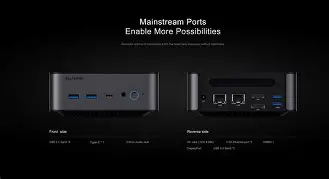
The GH8’s case feels solid and well-engineered for its size. The chassis is compact without feeling cheap. I liked the layout of ports: multiple USB-A, USB-C, dual HDMI/DisplayPort options depending on the model, a gigabit Ethernet jack, and a 3.5mm audio port. In my experience the combination of wired Ethernet plus dual video outputs made the GH8 versatile for both office monitor setups and TV connections.
One small disappointment: some of the USB ports are crowded together, and plugging a wide USB dongle next to another port can be awkward. I also noticed that the power adapter is relatively large compared to the box itself, so if you expect a completely cable-free minimal look, you may still need to tuck the adapter away.
Discover deals on Laptops & Computers — updated daily.
Shop Amazon →Storage and Memory — Upgradeability
I appreciated that the GH8 accepted an NVMe SSD and had accessible SO-DIMM slots for RAM in my unit. I upgraded the RAM to 32GB within a single afternoon — the bottom panel comes off with a small set of screws and the slots are clearly labelled. I noticed that while the SSD slot was standard M.2, the unit’s layout meant you need a low-profile cooler for certain NVMe drives if you want to cover the drive with a heatsink.
One thing that bothered me early on was a slightly finicky BIOS setting related to boot prioritization that forced me to reconfigure secure boot and fast-boot options when changing drives. It wasn’t hard, but it was a hurdle I didn’t expect on a consumer mini PC.
Software, Drivers, and OS Experience
In my experience the GH8 works well with Windows 11 out of the box — drivers for audio, networking, and graphics were recognized automatically in many cases. I did have to fetch a couple of driver updates from Alliwava’s support site to fix a Wi-Fi driver stability issue I encountered in my early weeks of ownership; after updating, Wi-Fi became rock-solid.
I also installed Linux on this machine to test compatibility. The OS installed fine, and basic functionality worked, but I had to troubleshoot power-management quirks and touch some kernel parameters to get perfect suspend/wake behavior. If you plan to run Linux, be ready for a short setup session to tune power and Wi-Fi drivers.
Real-World Reliability and Day-to-Day Notes
After months of using it as my daily driver, the GH8 has been reliable. I like that it wakes quickly when I start work and doesn’t demand the desk footprint of a tower. I noticed that updates occasionally required manual intervention — Windows updates sometimes insist on reboots that take longer than expected because the machine applies firmware updates — so plan around that when you’re in the middle of a deadline.
I also used the GH8 as a small home server for lightweight tasks like file sharing and a Plex instance for a few users. Performance was adequate for transcoding single 1080p streams and handling multiple 4K passthrough streams, though multiple simultaneous transcodes pushed thermal limits.
Pros & Cons
- Pros
- Very compact — easy to hide behind a monitor or in a media cabinet
- Solid everyday performance for office work, streaming, and light creative tasks
- Low idle power consumption and quiet operation under light loads
- Good port selection for most setups (USB, USB-C, Ethernet, multiple video outputs)
- Upgradeable RAM and NVMe storage in my unit — easy DIY upgrades
- Cons
- Thermal throttling under sustained heavy loads limits long-duration performance
- Fan noise becomes noticeable when pushed hard
- Driver quirks at first boot — required manual driver updates for stable Wi-Fi
- Some ports are tightly spaced which can complicate using wide USB adapters
- Power adapter size is relatively large for such a small chassis
Quick Comparison: How the GH8 Stacks Up
| Feature | Alliwava GH8 (my unit) | Typical Intel NUC | Typical Beelink / Minisforum |
|---|---|---|---|
| Form Factor | Very compact, VESA-mountable | Compact, premium finish | Compact, often fan-cooled |
| Performance | Good for productivity and media; limited under sustained heavy loads | Similar single-core results; some models offer higher sustained performance | Comparable; varies by CPU choice |
| Upgradeability | SO-DIMM + M.2 NVMe in my model | Often modular but model-dependent | Usually offers RAM + M.2; varies by SKU |
| Thermals & Noise | Quiet at idle; noticeable under long loads | Typically similar; some NUCs use better cooling | Varies; higher-end models better cooled |
| Ports | Good mix (USB-A, USB-C, Ethernet, dual video) | Often better selection on premium models | Good selection, sometimes extra USB ports |
| Value | High value for general use in my experience | Premium pricing on higher-end NUCs | Competitive pricing; similar value |
Buying Guide — Is the GH8 Right for You?
If you’re considering the GH8, here are the practical points I used when deciding and what I recommend based on my months of use.
Decide on Your Use Case
In my experience, mini PCs shine in these scenarios:
- As a desktop replacement for web, office apps, and light content creation.
- As a living-room media player that stays hidden and quiet.
- As a travel-friendly compact work machine if you need more horsepower than a Chromebook and less bulk than a laptop.
If you need sustained heavy compute for 3D rendering, long gaming sessions, or heavy video encoding, a full desktop or a laptop with stronger cooling will be a better choice.
Find top-rated Laptops & Computers products at great prices.
See Deals →Choose the Right Configuration
My advice from experience:
- Pick at least 16GB of RAM if you run multiple browser tabs and productivity apps. I upgraded to 32GB and noticed a smoother experience in heavy multitasking.
- Choose an NVMe SSD for snappy responsiveness. SATA is fine for storage, but NVMe makes the system feel quicker day-to-day.
- If you will do any light photo or video work, favor the higher-clock CPU option available in the GH8 family.
Check Upgrade Options and Warranty
I found it helpful to confirm whether the specific SKU you buy allows user upgrades. Some configurations solder RAM or limit M.2 slots. Also check warranty terms and regional support because driver fixes and firmware updates matter in the first months of ownership.
Consider I/O Needs and Placement
Think about how many USB devices, screens, or wired network connections you need. In my experience, having at least one USB-C and two video outputs made the GH8 flexible across desk and living-room setups. If you rely on many peripherals, plan for a powered USB hub.
Operating System: Windows vs Linux
Windows 11 provided the smoothest out-of-the-box experience for me. Linux works well but may require additional tuning for suspend/wake and Wi-Fi drivers — I recommend checking community forums for your distribution if you choose Linux.
Final Thoughts and Conclusion
After using the Alliwava GH8 daily for several months, I can say the experience has been broadly positive. In my experience the machine delivers excellent value for anyone wanting a compact, quiet, and capable PC for general productivity, streaming, and light creative work. I appreciated the small footprint, the fast responsiveness with an NVMe drive, and the ability to upgrade RAM when my multitasking needs grew.
What I found was that the GH8 is not flawless: it shows its limits under prolonged heavy loads with fan noise and thermal throttling, and initial driver hiccups required a small amount of troubleshooting. Those trade-offs are predictable for machines this size, but they mattered in my workflow on days with long export jobs.
Would I recommend it? In my experience, yes — especially if you value desk space and quiet daily use more than peak sustained throughput. The GH8 hit that sweet spot for me: small, unobtrusive, upgradeable, and reliable for most of the tasks I throw at it. If your workloads are heavier, consider a larger system, but if you want a polished, practical mini PC that fits behind a monitor and gets real work done, the GH8 deserves serious consideration.